SSE Streaming Architecture — How Schema Weaver's Data Explorer Streams 18 Event Types and Chunked Payloads to the Browser
Part 5 of the Data Explorer architecture series. Covers the SSE protocol design, 18+ typed event types, chunked JSON for payloads exceeding 64KB, streaming table artifacts, backend FastAPI endpoint, Node.js proxy, and frontend parser with retry
SSE Streaming Architecture — How Schema Weaver's Data Explorer Streams 18 Event Types and Chunked Payloads to the Browser
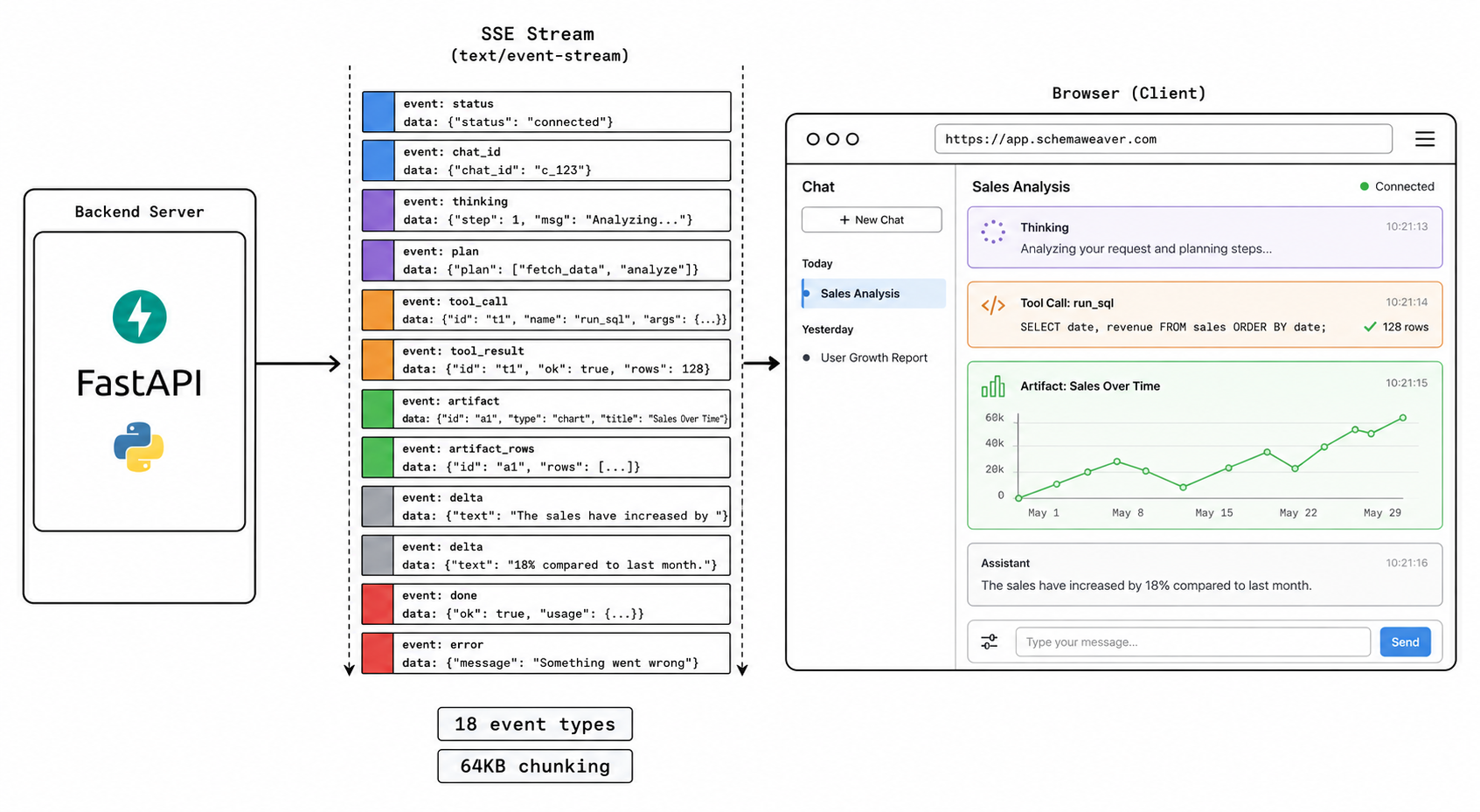
Every event in the agent's lifecycle — thinking, planning, tool calls, artifacts, text deltas, quota updates — is streamed in real-time via Server-Sent Events. The protocol defines 18+ event types with typed payloads, supports chunked JSON for payloads exceeding 64KB, and is parsed by a dedicated frontend hook layer.
This is Part 5 of the Data Explorer architecture series. In Part 4 we covered how the agent routes requests across four LLM providers and fails over mechanically when circuits break. This part covers the transport layer that carries the agent's lifecycle from server to browser: a typed SSE protocol with 18+ event types, automatic chunked JSON for oversized payloads, streaming table artifacts, and a frontend parser that retries transient failures with exponential backoff.
1. Why SSE, Not WebSockets
We chose SSE over WebSockets for several practical reasons. The agent conversation is inherently unidirectional during execution — the user sends a request, then the agent streams a response. There's no need for the browser to send messages back to the server mid-stream. Standard HTTP POST initiates the request; SSE delivers the response.
| Factor | SSE | WebSocket |
|---|---|---|
| Direction | Server → Client (one-way) | Bidirectional |
| Reconnection | Built-in auto-reconnect | Manual implementation |
| Protocol | HTTP — works with proxies, CDNs, load balancers | Upgrade + persistent socket |
| Complexity | ~50 lines of parsing code | Connection management, heartbeats, ping/pong |
| Our use case | Agent streams events to browser | Agent doesn't need browser → server messages mid-stream |
WebSocket's bidirectional capability is wasted in our scenario. We never need the browser to push mid-stream — that's what the initial POST is for. SSE gives us the simpler protocol, built-in reconnection, and compatibility with every HTTP-aware piece of infrastructure between the browser and our Python backend.
2. SSE Event Protocol
2.1 Frame Format
Every SSE frame follows the standard format:
event: <event_type>
data: <json_payload>
Two newlines (\n\n) separate frames. The sse() helper function in the backend constructs frames:
def sse(event: str, data: dict) -> str:
    """Build a single SSE frame."""
    json_str = json.dumps(data, default=str)
    return f"event: {event}\ndata: {json_str}\n\n"
2.2 Event Types
The protocol defines 18+ distinct event types, organized into six lifecycle categories:
graph TB
    subgraph "Agent Lifecycle Events"
        E_STATUS["status<br/>Phase transitions"]
        E_CHAT_ID["chat_id<br/>Session tracking"]
        E_CONTEXT["context_meta<br/>Context window info"]
    end

    subgraph "Reasoning Events"
        E_THINK["thinking<br/>Full thinking block"]
        E_THINK_CHUNK["thinking_chunk<br/>Streaming thought delta"]
        E_THINK_CLEAR["thinking_clear<br/>Replace thinking with answer"]
        E_PLAN["plan<br/>Analysis plan steps"]
        E_PLAN_UPDATE["plan_update<br/>Step status change"]
    end

    subgraph "Tool Events"
        E_TOOL_CALL["tool_call<br/>Tool invocation start"]
        E_TOOL_RESULT["tool_result<br/>Tool execution result"]
        E_TOOL_RETRY["tool_retry<br/>Retry attempt"]
    end

    subgraph "Artifact Events"
        E_ART_START["artifact_start<br/>Placeholder card"]
        E_ART["artifact<br/>Full artifact data"]
        E_ART_ROWS["artifact_rows<br/>Streaming table rows"]
    end

    subgraph "Content Events"
        E_DELTA["delta<br/>Text content delta"]
    end

    subgraph "Completion Events"
        E_DONE["done<br/>Agent completed"]
        E_ERROR["error<br/>Agent error"]
        E_QUOTA["quota_exceeded<br/>Credit limit hit"]
        E_QUOTA_UP["quota_update<br/>Usage snapshot"]
    end
2.3 Event Payloads — Detailed Reference
status — Phase Transitions
{
    "phase": "planning",
    "detail": "Classifying query intent...",
    "iteration": 0
}
Phases: idle → planning → executing → synthesizing → done
thinking_chunk — Real-Time Reasoning
{
    "text": "I need to check what tables contain customer data. Let me "
}
Thinking chunks are streamed word-by-word as the LLM reasons. They appear in a collapsible "thinking" section in the UI.
thinking_clear — Transition to Answer
{}Emitted when the LLM stops thinking and starts generating the final answer. The frontend moves the thinking text into a collapsed section and begins rendering the answer.
tool_call — Tool Invocation Start
{
    "id": "call_003",
    "name": "compute_trend",
    "input": {
        "connection_id": "conn_abc123",
        "table_name": "orders",
        "date_column": "created_at",
        "value_column": "total_amount",
        "granularity": "monthly"
    }
}
The frontend renders a "calling tool" card with the tool name and parameters.
tool_result — Tool Execution Result
{
    "id": "call_003",
    "name": "compute_trend",
    "success": true,
    "summary": "Monthly trend (12 months): direction=up, change=+23.5%, slope=1850.42",
    "latency_ms": 245
}
The card updates to show success/failure, a brief summary, and execution time.
artifact_start — Artifact Placeholder
{
    "id": "compute_trend_1716710400000",
    "type": "trend",
    "title": "Trend Analysis",
    "previewType": "chart"
}
The frontend renders a loading placeholder card. This appears immediately so the user sees the artifact shape before data arrives.
artifact — Full Artifact Data
{
    "id": "compute_trend_1716710400000",
    "type": "trend",
    "title": "Monthly Revenue Trend",
    "previewType": "chart",
    "chartType": "line",
    "labels": ["2025-06", "2025-07", "2025-08", "..."],
    "values": [42000, 45500, 48200, "..."],
    "direction": "up",
    "changePercent": 23.5,
    "streaming": false
}
The placeholder card is replaced with the fully rendered artifact (chart, table, or stat block).
artifact_rows — Streaming Table Rows
For tables with >50 rows, rows are streamed in batches:
{
    "artifactId": "run_query_1716710400000",
    "rows": [{"id": 51, "name": "..."}, {"id": 52, "name": "..."}, "..."],
    "done": false
}
{
"artifactId": "run_query_1716710400000",
"rows": [{"id": 101, "name": "..."}, "..."],
"done": true
}The frontend accumulates rows and renders them progressively. When done: true, the loading spinner is removed.
delta — Text Content Delta
{
    "text": "Based on the trend analysis, ",
    "chat_id": "chat_abc123"
}
Text deltas are accumulated to form the final answer. They are rendered word-by-word in the chat bubble.
done — Agent Completed
{
    "usage": {
        "input_tokens": 12500,
        "output_tokens": 850,
        "outputTokens": 850,
        "synthesisModel": "gpt-4o-mini",
        "creditsUsed": 3.2
    },
    "iterations": 4,
    "toolsUsed": ["list_tables", "get_schema", "compute_trend"],
    "chat_id": "chat_abc123"
}
quota_update — Usage Snapshot
{
    "credits_used": 3.2,
    "credits_remaining": 81.8,
    "daily_remaining": 76.2,
    "monthly_pct": 22
}
Sent after the agent completes so the frontend can update the usage display.
error — Agent Error
{
    "message": "Monthly credit limit reached. Used 500/500 credits this month.",
    "code": "QUOTA_EXCEEDED"
}
3. Chunked Payload Support
SSE payloads have practical size limits (~64KB in many proxy/CDN configurations). Large artifacts (tables with hundreds of rows) can exceed this limit. The emitter solves this with automatic chunking:
MAX_SSE_PAYLOAD_BYTES = 64 * 1024  # 64 KB

def sse(event: str, data: dict) -> str:
    json_str = json.dumps(data, default=str)

    if len(json_str.encode()) <= MAX_SSE_PAYLOAD_BYTES:
        return f"event: {event}\ndata: {json_str}\n\n"

    # Chunk into multiple frames
    chunks = []
    total = math.ceil(len(json_str.encode()) / MAX_SSE_PAYLOAD_BYTES)

    for i, start in enumerate(range(0, len(json_str), MAX_SSE_PAYLOAD_BYTES)):
        chunk_data = {
            "chunk_index": i,
            "total_chunks": total,
            "payload": json_str[start:start + MAX_SSE_PAYLOAD_BYTES],
        }
        chunks.append(f"event: {event}_chunk\ndata: {json.dumps(chunk_data)}\n\n")

    return "".join(chunks)
The frontend reconstructs chunked payloads:
// Accumulate chunks until all are received
if (event.endsWith('_chunk')) {
    const baseEvent = event.replace('_chunk', '');
    const { chunk_index, total_chunks, payload } = data;

    if (!chunkBuffer[baseEvent]) {
        chunkBuffer[baseEvent] = new Array(total_chunks);
    }
    chunkBuffer[baseEvent][chunk_index] = payload;

    // Check if all chunks received
    if (chunkBuffer[baseEvent].filter(Boolean).length === total_chunks) {
        const fullPayload = JSON.parse(chunkBuffer[baseEvent].join(''));
        handleEvent(baseEvent, fullPayload);
        delete chunkBuffer[baseEvent];
    }
}
The chunking is transparent to event handlers — they only ever see reconstructed payloads. The buffer is keyed by base event name so concurrent chunked events (e.g., two large artifacts streaming simultaneously) don't collide.
4. Streaming Table Artifacts
Large table results use a dedicated streaming protocol instead of chunking. Rather than buffering the entire table into one JSON payload and splitting it across frames, the backend emits rows in fixed-size batches:
sequenceDiagram
    participant BE as Backend
    participant FE as Frontend

    Note over BE: Table has 200 rows

    BE->>FE: SSE: artifact_start {id: "q1", type: "query", previewType: "table"}
    Note over FE: Render loading card

    BE->>FE: SSE: artifact {id: "q1", rows: [row 1-50], streaming: true}
    Note over FE: Render first 50 rows + loading indicator

    BE->>FE: SSE: artifact_rows {artifactId: "q1", rows: [row 51-100], done: false}
    Note over FE: Append rows

    BE->>FE: SSE: artifact_rows {artifactId: "q1", rows: [row 101-150], done: false}
    Note over FE: Append rows

    BE->>FE: SSE: artifact_rows {artifactId: "q1", rows: [row 151-200], done: true}
    Note over FE: Append rows, remove loading indicator
The batch size is 50 rows. This ensures:
- The first render happens in <200ms (50 rows is fast to render)
- Subsequent batches are appended without blocking the UI
- Memory consumption is bounded (no 10K-row JSON blob in a single SSE frame)
# From artifact_emitter.py
rows = payload.get("rows", [])
if rows and len(rows) > 50:
    # First batch
    first_batch = rows[:50]
    events.append(sse("artifact", {
        **payload, "rows": first_batch, "streaming": True,
    }))

    # Remaining batches
    for i in range(50, len(rows), 50):
        batch = rows[i:i+50]
        done = i + 50 >= len(rows)
        events.append(sse("artifact_rows", {
            "artifactId": artifact_id,
            "rows": batch,
            "done": done,
        }))
5. Backend SSE Endpoint
The FastAPI endpoint uses StreamingResponse with the text/event-stream content type:
from fastapi import Request
from fastapi.responses import StreamingResponse

@router.post("/agent/run")
async def run_agent(request: Request):
    body = await request.json()

    # Pre-flight checks (UsageGuard)
    guard_result, budget = await guard.check(
        user_id=body["userId"],
        model=body.get("synthesisModel", "gpt-4o-mini"),
        session_id=body.get("session_id", ""),
        estimated_tokens=500,
    )

    # Build execution context
    ctx = ExecutionContext(
        user_id=body["userId"],
        connection_id=body["connectionId"],
        schema_name=body.get("schemaName", "public"),
        message=body["message"],
        history=body.get("history", []),
        synthesis_model=body.get("synthesisModel", "gpt-4o-mini"),
        session_id=body.get("session_id", ""),
    )

    async def stream_generator():
        try:
            agent = SingleLLMAgent(registry=app_state["registry"])
            async for frame in agent.run(
                user_query=ctx.message,
                ctx=ctx,
                budget=budget,
            ):
                yield frame
        except Exception as exc:
            yield sse("error", {"message": str(exc)})
        finally:
            await guard.release_slot(ctx.user_id)

    return StreamingResponse(
        stream_generator(),
        media_type="text/event-stream",
        headers={
            "Cache-Control": "no-cache",
            "X-Accel-Buffering": "no",  # Disable Nginx buffering
        },
    )
Critical headers:
Cache-Control: no-cache— prevents proxy caching of the streamX-Accel-Buffering: no— tells Nginx to flush frames immediately rather than buffering
The X-Accel-Buffering: no header is non-obvious but essential. Without it, Nginx buffers the entire SSE stream before forwarding to the browser, which defeats the entire purpose of streaming. The browser would see nothing until the agent finished, then receive every event at once.
6. Node.js SSE Proxy
The Node.js backend proxies the SSE stream from the Python backend to the browser. This proxy must:
- Forward frames immediately — no buffering
- Preserve event types — pass through all
event:/data:lines unchanged - Handle disconnection — abort the Python request if the browser disconnects
// Node.js proxy (simplified)
router.post('/api/ai/agent', async (req, res) => {
    const userId = req.session.userId;

    // Forward to Python backend
    const pyResponse = await fetch(`${AI_BACKEND_URL}/agent/run`, {
        method: 'POST',
        headers: { 'Content-Type': 'application/json' },
        body: JSON.stringify({
            userId,
            connectionId: req.body.connectionId,
            message: req.body.message,
            history: req.body.history,
            synthesisModel: req.body.synthesisModel,
            // ... other fields
        }),
    });

    // Set SSE headers
    res.setHeader('Content-Type', 'text/event-stream');
    res.setHeader('Cache-Control', 'no-cache');
    res.setHeader('Connection', 'keep-alive');
    res.flushHeaders();

    // Stream-pipe from Python → browser
    for await (const chunk of pyResponse.body) {
        res.write(chunk);
    }

    res.end();
});
7. Frontend SSE Parsing
The frontend uses a dedicated async function (startAgentStream) that handles the full SSE lifecycle:
async function _streamOnce(
    request: AgentRequest,
    onEvent: StreamEventCallback,
    signal: AbortSignal,
): Promise<void> {
    const response = await fetch(`${API_BASE_URL}/api/ai/agent`, {
        method: 'POST',
        headers: {
            'Content-Type': 'application/json',
            ...(getCsrfToken() ? { 'X-CSRF-Token': getCsrfToken()! } : {}),
        },
        credentials: 'include',
        body: JSON.stringify({ /* request fields */ }),
        signal,
    });

    const reader  = response.body!.getReader();
    const decoder = new TextDecoder();
    let buffer       = '';
    let currentEvent: string | null = null;

    while (true) {
        const { done, value } = await reader.read();
        if (done) break;

        buffer += decoder.decode(value, { stream: true });
        const lines = buffer.split('\n');
        buffer = lines.pop() ?? '';  // Keep incomplete line

        for (const line of lines) {
            if (line.startsWith('event: ')) {
                currentEvent = line.slice(7).trim();
            } else if (line.startsWith('data: ') && currentEvent) {
                const data = JSON.parse(line.slice(6));
                const stop = onEvent(currentEvent, data);
                if (stop) return;  // "done" or "error" → stop reading
                currentEvent = null;
            }
        }
    }
}
Retry with Exponential Backoff
The stream layer includes automatic retry for transient failures:
const MAX_RETRIES   = 3;
const RETRY_BASE_MS = 1_000;

for (let attempt = 0; attempt < MAX_RETRIES; attempt++) {
    if (attempt > 0) {
        const delay = RETRY_BASE_MS * 2 ** (attempt - 1);  // 1s, 2s, 4s
        await sleep(delay);
    }
    try {
        await _streamOnce(request, onEvent, signal);
        return;  // Success
    } catch (err) {
        if (err instanceof HttpError && err.status >= 400 && err.status < 500) {
            throw err;  // 4xx = client error, don't retry
        }
    }
}
HTTP 4xx errors (auth failures, validation errors, quota exceeded) are NOT retried — they require user action. Only network errors and 5xx server errors trigger retries. This is critical: retrying a 401 Unauthorized or 402 Payment Required just burns retries on a problem the user has to solve.
What This Architecture Buys Us
The SSE protocol design gives us three properties that would be hard to achieve with a simpler transport:
Typed lifecycle visibility. The 18 event types aren't decorative — each maps to a specific UI affordance. thinking_chunk powers the collapsible reasoning panel. tool_call and tool_result power the tool execution cards. artifact_start lets us render a placeholder before data arrives, so users see the artifact shape immediately rather than waiting for the full payload. The frontend doesn't have to infer state from text deltas — the protocol tells it explicitly what's happening.
Graceful degradation under size constraints. The 64KB payload limit is real — proxies, CDNs, and load balancers all have different thresholds. Automatic chunking means the agent can emit a 500-row table result without worrying about transport limits. The streaming-table protocol goes further: instead of buffering the entire result and chunking it, we emit rows in 50-row batches, which means the first rows render in <200ms even for a 10,000-row result.
Resilience without complexity. SSE's built-in reconnection plus our exponential backoff layer means transient network failures recover transparently. The 4xx-vs-5xx distinction prevents wasted retries on user-actionable errors. The whole retry layer is ~20 lines of TypeScript.
Part 6 will cover the frontend architecture — how the React layer consumes this event stream, manages artifact state, and renders the chat UI in real time.
Next: Part 6 — Frontend Architecture (coming soon)