The SingleLLM Agent: How One Model, One Loop, and 15 Iterations Build a Reasoning Engine
Most agentic AI systems reach for multi-agent orchestration before they need it. Schema Weaver's Data Explorer takes the opposite path — one LLM, one growing conversation, up to 15 iterations of Plan → Execute → Observe → Reason. No coordinator. No planner agent. Just a single reasoning thread with direct tool access, intent-classified tool filtering, and enough error recovery to survive production. Here is how it actually works. Part 2 of The Data Explorer Chronicles.
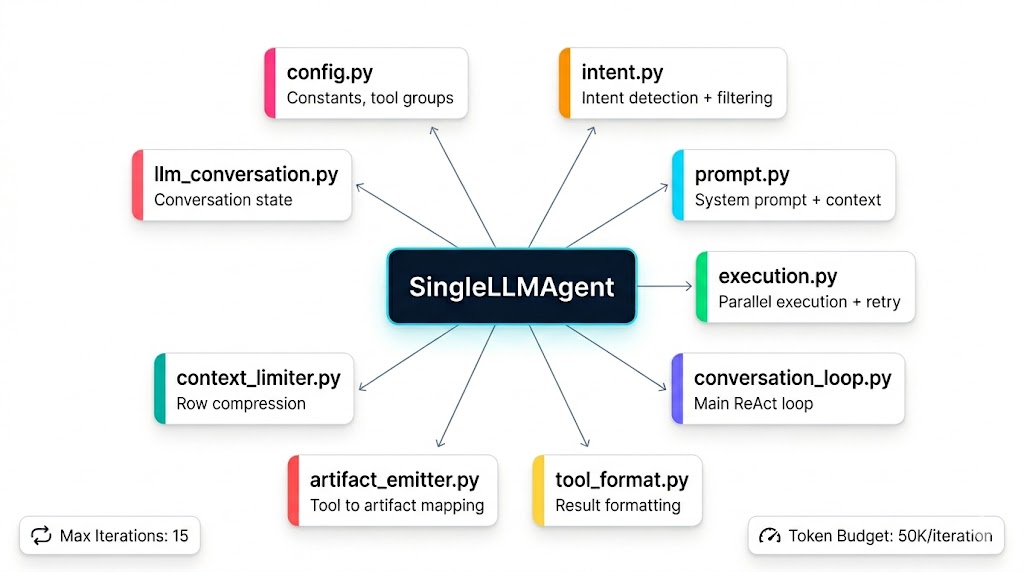
The Data Explorer agent is a SingleLLM conversation loop — one model, one growing conversation, up to 15 iterations of Plan → Execute → Observe → Reason. No multi-agent coordination. No separate planner. Just a single reasoning thread with direct tool access.
1. The SingleLLM Agent
At the core of Data Explorer is SingleLLMAgent — a deliberately minimal orchestrator that delegates everything to focused modules:
SingleLLMAgent
├── config.py             — Constants, tool groups, retry settings
├── intent.py             — LLM-based intent detection + tool filtering
├── prompt.py             — System prompt loading + context injection
├── execution.py          — Parallel tool execution with retry
├── conversation_loop.py  — Main ReAct loop
├── tool_format.py        — Result formatting + summarization
├── artifact_emitter.py   — Tool → artifact mapping
├── context_limiter.py    — Three-tier row compression
└── llm_conversation.py   — Conversation state tracking
The agent's run() method is an async generator that yields SSE frames. This design means the caller (the API route) simply iterates and forwards each frame to the HTTP response — zero buffering, zero intermediate storage.
# Simplified agent invocation (from the API route)
async def handle_agent_request(request):
    agent = SingleLLMAgent(registry=tool_registry)

    async for sse_frame in agent.run(
        user_query=request.message,
        ctx=execution_context,
        budget=agent_budget,
    ):
        yield sse_frame  # Directly forwarded to HTTP response
2. Agent Initialization
When run() is called, the agent performs the following setup before entering the conversation loop:
2.1 Session Isolation
# Fresh-session isolation — prevent memory bleed between unrelated requests
if not ctx.is_follow_up_session:
    ctx.memory_context_block = ""
    ctx.intent_meta = {}
Each new session starts clean. Follow-up messages within the same chat session retain context.
2.2 System Prompt Construction
The system prompt is loaded from a template file and augmented with runtime context:
def build_system_prompt(base_prompt: str, ctx: ExecutionContext) -> str:
    context_lines = []

    if ctx.connection_id:
        context_lines.append(f"Connection ID: {ctx.connection_id}")
    if ctx.schema_name:
        context_lines.append(f"Default schema: {ctx.schema_name}")
    if ctx.database_name:
        context_lines.append(f"Database name: {ctx.database_name}")
    if ctx.memory_context_block:
        context_lines.append(f"\nPRIOR SESSION CONTEXT:\n{ctx.memory_context_block}")

    return base_prompt + "\n\n" + "\n".join(context_lines)
The assembled prompt includes:
- Core persona — "You are Resona, an AI data analyst with direct access to a PostgreSQL database."
- Agentic execution rules — Plan → Execute → Summarize → Next cycle
- Tool selection mappings — 30+ explicit tool-to-intent mappings (e.g., "trend over time" →
compute_trend) - Report generation workflow — Multi-step instructions for producing PDF/PPT exports
- Safety rules — Never invent data, never repeat artifact contents, reference the source of truth
- Connection context — Database name, schema, connection ID
- Memory context — Prior session summaries and facts from episodic memory
2.3 Conversation History Injection
Multi-turn conversations are supported by replaying prior messages:
conv = LLMConversation()
conv.messages = [{"role": "system", "content": system}]

# Inject prior turn history
if ctx.history:
    for msg in ctx.history:
        if msg["role"] == "user":
            conv.messages.append({"role": "user", "content": msg["content"]})
        elif msg["role"] == "assistant":
            conv.messages.append({"role": "assistant", "content": msg["content"]})

# Add current user query
conv.messages.append({"role": "user", "content": user_query})
2.4 Multi-Step Request Detection
For requests containing keywords like "step", "sequentially", or "one by one", the agent injects an execution constraint:
if any(kw in user_query.lower() for kw in ["step", "sequentially", "one by one"]):
    step_guide = (
        "⚠️ EXECUTION RULE: This is a multi-step request. "
        "Do ONLY steps 1-2 right now. Summarize findings. "
        "Then ask the user: 'Ready for the next steps?'"
    )
    conv.messages.append({"role": "system", "content": step_guide})
    effective_max_iter = 5  # Reduced from 15
3. Intent Classification
Before entering the conversation loop, the agent classifies the user's intent to determine which tools to make available. This is the single most impactful optimization in the system.
3.1 Why Intent Classification Matters
The full tool registry contains 50+ tools. Sending all tool schemas to the LLM consumes ~18,000 tokens per iteration. With 15 iterations, that's 270,000 tokens just for tool definitions — before any actual work.
Intent classification cuts tool schemas from ~18K → ~2K tokens per iteration.
3.2 Two-Layer Classification
Intent classification uses a two-layer approach:
Layer 1: LLM-based classification (primary, accurate)
async def classify_data_explorer_intent(query, history):
    resp = await call_tool_llm(
        messages=[
            {"role": "system", "content": INTENT_CLASSIFIER_PROMPT},
            *recent_history_messages,
            {"role": "user", "content": query},
        ],
        max_tokens=300,
        node_name="intent",
    )
    # Parse JSON response → DataExplorerIntentResult
    return DataExplorerIntentResult.from_dict(parsed)
The LLM returns structured JSON:
{
    "primary_intent": "time",
    "secondary_intents": ["analyze"],
    "table_hints": ["customers", "orders"],
    "column_hints": ["created_at", "total"],
    "confidence": 0.92
}
Layer 2: Keyword-based fallback (cheap, always-available)
def detect_intent(query: str) -> str:
    msg = query.lower()

    if any(w in msg for w in ["trend", "over time", "monthly", "daily"]):
        return "time"
    if any(w in msg for w in ["segment", "cohort", "funnel", "retention"]):
        return "segment"
    if any(w in msg for w in ["anomaly", "outlier", "quality", "duplicate"]):
        return "quality"
    # ... 13 intent categories

    return "explore"  # Default safe fallback
3.3 Intent Categories and Tool Groups
The system defines 13 intent categories, each mapping to a focused tool group:
graph LR
    subgraph "Intent Categories"
        I1["explore"]
        I2["analyze"]
        I3["time"]
        I4["segment"]
        I5["quality"]
        I6["report"]
        I7["compare"]
        I8["predict"]
        I9["meta"]
        I10["memory"]
        I11["workspace"]
        I12["research"]
        I13["conversational"]
    end

    subgraph "Tool Groups"
        T1["list_tables, get_schema,
sample_rows, count_rows"]
        T2["compute_statistics,
compute_distribution,
compute_correlation,
compute_aggregation,
compute_top_n"]
        T3["compute_trend,
compare_periods,
compute_moving_average,
detect_seasonality"]
        T4["segment_data,
compute_cohort,
compute_funnel,
compute_retention"]
        T5["detect_anomalies,
check_quality,
detect_outliers,
compute_cardinality"]
    end

    I1 --> T1
    I2 --> T2
    I3 --> T3
    I4 --> T4
    I5 --> T5
Additionally, three always-on tools are available regardless of intent:
run_query— the SQL escape hatchask_clarification— request user clarificationweb_search— live internet search
3.4 Intent-Based Model Selection
Different intents map to different default models, optimizing for cost:
BEST_MODEL_PER_INTENT = {
    "explore":       "amazon.nova-micro-v1:0",   # Simple discovery — cheapest
    "analyze":       "amazon.nova-lite-v1:0",    # Needs reasoning
    "time":          "amazon.nova-lite-v1:0",    # Time series analysis
    "segment":       "amazon.nova-lite-v1:0",    # Segmentation logic
    "quality":       "amazon.nova-micro-v1:0",   # Pattern detection — cheap
    "report":        "amazon.nova-lite-v1:0",    # Report generation
    "predict":       "amazon.nova-lite-v1:0",    # Needs reasoning
    "meta":          "amazon.nova-micro-v1:0",   # Suggestions — cheap
    "conversational":"amazon.nova-micro-v1:0",   # Greetings — cheap
}
Users can override the model via synthesisModel in their request. The default is a cost-optimized choice — Nova Micro ($0.035/1M input tokens) for simple tasks, Nova Lite ($0.06/1M) for reasoning-heavy tasks.
4. The Conversation Loop (ReAct Execution)
The conversation loop is the heart of the agent. It implements a ReAct (Reason + Act) pattern:
flowchart TB
    START(["Start Loop"]) --> INTENT_CHECK{"Iteration > 0 AND
iteration % 3 == 0?"}
    INTENT_CHECK -->|Yes| RECHECK["Re-detect intent
Update tool set"]
    INTENT_CHECK -->|No| TOKEN_CHECK
    RECHECK --> TOKEN_CHECK

    TOKEN_CHECK{"Estimated tokens
> 50,000?"}
    TOKEN_CHECK -->|Yes| FORCE_ANSWER["Force final answer
⚠️ Context too large"]
    TOKEN_CHECK -->|No| TRIM

    TRIM["Trim conversation
if > 40 messages"]
    TRIM --> LLM_CALL

    LLM_CALL["stream_tool_llm()
→ thinking + tool_calls OR text"]
    LLM_CALL --> HAS_TOOLS{"LLM returned
tool_calls?"}

    HAS_TOOLS -->|No| EMIT_ANSWER["Emit thinking_clear
Stream final answer
word-by-word"]
    EMIT_ANSWER --> DONE(["Break Loop"])

    HAS_TOOLS -->|Yes| EMIT_THINKING["Emit thinking event"]
    EMIT_THINKING --> DEDUP["Parse + dedup
tool calls"]
    DEDUP --> PARALLEL_EXEC["Execute tools
in parallel"]
    PARALLEL_EXEC --> PROCESS["Process results:
• Retry on failure
• Record in conversation
• Emit artifacts
• Inject tool results"]
    PROCESS --> NEXT{"iteration < max
iterations?"}
    NEXT -->|Yes| INTENT_CHECK
    NEXT -->|No| FORCE_ANSWER
4.1 Loop Mechanics
Each iteration of the loop performs these steps:
Step 1: Dynamic Intent Recheck
Every 3 iterations, the agent re-examines its output to detect intent shifts. If the conversation started as "explore" but the LLM is now generating aggregation queries, the tool set is updated:
if iteration > 0 and iteration % INTENT_RECHECK_INTERVAL == 0:
    new_intent = detect_intent(conv.full_answer() or "")
    if new_intent != _base_intent:
        _current_tool_set = get_relevant_tools(registry, new_intent)
Step 2: Token Budget Guard
Before each LLM call, the system estimates the current context size:
def estimate_tokens(messages):
    """Rough token estimate: 1 token ≈ 4 chars + 4 per message overhead."""
    total = sum(len(m.get("content", "")) // 4 + 4 for m in messages)
    return total

if current_tokens > MAX_ITERATION_TOKENS:  # 50,000
    yield sse("warning", {"message": "Context too large — generating answer."})
    break
Step 3: Context Compression (Trim)
conv.trim_if_needed(MAX_MESSAGES) # MAX_MESSAGES = 40If the conversation exceeds 40 messages, the oldest non-system messages are dropped to prevent context overflow.
Step 4: LLM Streaming Call
The agent calls the LLM with streaming enabled:
async for _ev, _data in stream_tool_llm(
    messages=conv.messages,
    tools=initial_tool_schemas,
    tool_choice="auto",
    max_tokens=4096,
    provider_ctx=_provider_ctx,
):
    if _ev == "thinking_chunk":
        yield sse("thinking_chunk", {"text": _data})
    elif _ev == "text_chunk":
        yield sse("thinking_chunk", {"text": _data})
    elif _ev == "done":
        result = _data
Three things happen during this call:
- Thinking chunks are streamed to the frontend in real-time, so users can watch the agent reason
- Text chunks (non-tool content) are also streamed as thinking
- The final result contains either tool calls or text content
Step 5: Tool Call Deduplication
Before executing tool calls, the agent deduplicates them against all prior tool calls in the conversation:
dedup_key = f"{fn_name}:{normalize_args(fn_args)}"
if dedup_key in _seen_tool_keys:
    logger.info("Skipping duplicate call: %s", fn_name)
    continue
_seen_tool_keys.add(dedup_key)
This prevents the common failure mode where an LLM repeatedly calls list_tables or re-fetches a schema it already has.
Step 6: Parallel Tool Execution
All tool calls from a single LLM response are executed in parallel:
results = await asyncio.gather(*[
    _run_one(tc, fn_name, fn_args, call_id)
    for tc, fn_name, fn_args, call_id in tool_tasks
])
This is critical for performance. When the LLM decides to fetch schemas for two tables simultaneously, both requests run concurrently rather than sequentially.
Step 7: Result Processing
Each tool result goes through:
- Retry logic — if the tool failed and is retryable (connection blips, lock timeouts), retry up to 2 times. SQL syntax errors are NOT retried.
- Record tracking — the call is logged in the conversation's
ToolCallRecord - Summary formatting — the full result is compressed to a 1-3 line summary for LLM context
- Artifact emission — if the tool produces data, an artifact (chart, table, stat block) is emitted
- Conversation injection — the tool result is injected back into the message list
5. Tool Execution Engine
The execution engine (execution.py) handles the complexity of running tools reliably in production.
5.1 Context Merging
Every tool call receives merged context from two sources:
exec_kwargs = {
    "user_id": ctx.user_id,            # From auth
    "connection_id": ctx.connection_id, # From request
    "schema_name": ctx.schema_name,     # From request
    "conversation": conv,               # For tools that need context
}
exec_kwargs.update(fn_args)  # LLM-provided args override
This means the LLM only needs to specify tool-specific arguments (e.g., table_name, sql). Context like user_id and connection_id are automatically injected.
5.2 Retry Logic
RETRYABLE_TOOLS = frozenset({
    "run_query", "sample_rows", "count_rows", "get_column_stats",
    "compute_statistics", "compute_aggregation",
})

if not success and fn_name in RETRYABLE_TOOLS:
    # DO NOT retry SQL errors (wrong column, syntax errors)
    is_sql_error = error_msg and any(msg in error_msg.lower() for msg in [
        "column", "relation", "syntax", "does not exist", "ambiguous"
    ])

    if not is_sql_error:
        for attempt in range(1, MAX_RETRIES + 1):
            yield sse("tool_retry", {
                "id": call_id, "name": fn_name,
                "attempt": attempt, "maxRetries": MAX_RETRIES,
            })
            retry_result = await registry.execute(fn_name, **retry_kwargs)
            if retry_result.status.value == "success":
                break
The distinction between retryable and non-retryable failures is important:
- Retryable: connection timeouts, lock contention, transient network errors
- Non-retryable: SQL syntax errors, missing columns, invalid table names — these require the LLM to generate a corrected query
5.3 Artifact Emission Pipeline
flowchart LR
    TOOL_RESULT["Tool Result"] --> CHECK{"In _TOOL_TO_ARTIFACT
mapping?"}
    CHECK -->|No| SKIP["No artifact
(exploratory tool)"]
    CHECK -->|Yes| BUILD["Build artifact payload"]
    BUILD --> TYPE{"Preview type?"}
    TYPE -->|table| TABLE_ART["Build table artifact
(columns, rows, SQL)"]
    TYPE -->|chart| CHART_ART["Build chart artifact
(chartType, labels, values)"]
    TYPE -->|stat_block| STAT_ART["Build stat block
(kind, metrics, issues)"]
    TYPE -->|other| SPECIAL["Build specialized
(joins, metrics, report)"]

    TABLE_ART --> SIZE{"> 50 rows?"}
    SIZE -->|Yes| STREAM_ROWS["Emit artifact_start
+ first 50 rows
+ artifact_rows batches"]
    SIZE -->|No| EMIT_ALL["Emit artifact_start
+ full artifact"]

    CHART_ART --> EMIT_ALL
    STAT_ART --> EMIT_ALL
    SPECIAL --> EMIT_ALL
Not every tool produces an artifact. Exploratory tools like list_tables, get_schema, and sample_rows appear as tool cards only — they're gathering information, not presenting results.
6. The LLMConversation Object
The LLMConversation class tracks the full state of an agent run:
class LLMConversation:
    messages: list[dict]          # The growing conversation (system + user + assistant + tool)
    iteration: int                # Current loop iteration
    total_input_tokens: int       # Cumulative input token count
    total_output_tokens: int      # Cumulative output token count
    tool_calls: list[ToolCallRecord]  # All tool executions with timing
    _text_deltas: list[str]       # Accumulated text fragments

    def add_usage(self, in_tok, out_tok, model):
        """Track token consumption per LLM call."""

    def record_tool_call(self, record: ToolCallRecord):
        """Record a tool execution with success/failure and latency."""

    def add_assistant_message(self, content, tool_calls_raw):
        """Inject the assistant's response (with tool calls) into the conversation."""

    def add_tool_result(self, call_id, summary):
        """Inject a tool result back into the conversation."""

    def trim_if_needed(self, max_messages):
        """Drop oldest non-system messages when conversation is too long."""

    def full_answer(self) -> str:
        """Concatenate all text deltas into the final answer string."""
The conversation grows naturally. After each iteration, the LLM sees:
messages = [
    {"role": "system", "content": "<system prompt>"},
    {"role": "user", "content": "Analyze customer retention trends"},
    {"role": "assistant", "content": "", "tool_calls": [{"id": "call_001", ...}]},
    {"role": "tool", "tool_call_id": "call_001", "content": "8 tables: users, orders, ..."},
    {"role": "assistant", "content": "", "tool_calls": [{"id": "call_002", ...}]},
    {"role": "tool", "tool_call_id": "call_002", "content": "Schema 'customers': 12 cols..."},
    ...
]
This is exactly the OpenAI function-calling format. For Anthropic and Gemini, the messages are converted to their native formats by _convert_messages_to_anthropic() and the Gemini converter in llm_clients.py.
7. Error Recovery
The agent has multiple error recovery mechanisms:
7.1 LLM Failure Recovery
If the streaming LLM call fails mid-stream, the system falls back to a non-streaming call:
except Exception as exc:
    # Streaming failed — fall back to non-streaming call
    result = await call_tool_llm(messages, tools, tool_choice, max_tokens)
    yield ("done", result)
7.2 Tool Failure Recovery
Failed tool calls are injected back into the conversation with error messages. The LLM sees the error and can:
- Correct the query — if
get_schemareveals the actual column name - Try a different approach — switch from
run_queryto a specialized tool - Ask for clarification — call
ask_clarificationif the request is ambiguous
7.3 Auto-Summary Fallback
If the LLM never produces text output (only tool calls), the agent generates a summary from tool results:
def _auto_summarize(self, conv):
    parts = []
    for tc in conv.tool_calls:
        if tc.success and tc.result:
            summary = format_tool_result(tc.name, tc.result.data or {})
            parts.append(f"- {tc.name}: {summary}")
    return "\n".join(parts)
7.4 Budget Exhaustion
The agent monitors its credit budget and stops gracefully when exhausted:
if budget.credits_used > budget.credits_allocated:
    yield emitter.emit(QuotaExceededEvent(
        reason="credits_exhausted",
        message="Credit limit reached for this session.",
        credits_used=budget.credits_used,
    ))
    break
8. The ExecutionContext
Every agent run is parameterized by an ExecutionContext — a dataclass that carries all runtime state:
@dataclass
class ExecutionContext:
    user_id: str                    # Authenticated user
    connection_id: str              # Database connection to use
    schema_name: str = "public"     # Default PostgreSQL schema
    message: str = ""               # The user's query
    history: list[dict]             # Prior conversation turns
    synthesis_model: str = "gpt-4o-mini"   # User's chosen model
    session_id: str = ""            # For memory correlation
    request_id: str = uuid4()       # Unique per-invocation
    database_name: str | None       # Human-readable DB name
    memory_context_block: str = ""  # Prior session summaries
    agent_type: str = "data_explorer"

    # Self-management state
    injected_context: dict = {}     # Key → text injected by inject_context tool
    stop_reason: str = ""           # "unanswerable" | "clarification" | ""
    clarification_question: str = ""

    # Runtime tracking
    tool_calls: list[ToolCall]
    artifacts: list[dict]
    iteration: int = 0
    MAX_ITERATIONS: int = 10        # Raised to 20 for report tasks
The context is passed through the entire call chain: agent → conversation loop → tool execution → individual tools. Tools access it to get connection_id, user_id, and other contextual information without requiring them as explicit parameters.
Next: Part 3 — The Tooling System →